
Why Do Hair Clippers Get Hot? Causes and Safe Fixes
, by Buy Barber , 12 min reading time
, by Buy Barber , 12 min reading time
Get safe answers to why do hair clippers get hot, plus a clear diagnostic sequence and maintenance habits that help barbers prevent overheating.
Why do hair clippers get hot? Fast-moving metal blades create friction, especially when they lack oil or contain trapped hair. The clipper body can also heat up when a dull, dirty, or poorly aligned blade makes the motor work harder. Stop whenever heat could discomfort a client, then cool, clean, inspect, and lubricate the tool.
Shop professional clipper oil to reduce blade friction and support smoother cutting.
Some warmth is expected during a busy service because a clipper converts electrical energy into motion and its cutter repeatedly slides across a stationary blade. Excessive heat is different. A blade that feels uncomfortable against your wrist or a housing that becomes unusually hot calls for an immediate pause. Professional barbers should treat rising temperature as useful diagnostic information, not something to ignore until the tool stops.
The safest response is simple: remove the clipper from the client, switch it off, disconnect it from power if applicable, and allow it to cool on a stable, dry surface. Do not use water, household oil, or an improvised repair to speed the process. Once it is cool, a methodical inspection can help distinguish routine friction from a problem that requires qualified service.
The most common source of blade heat is friction. A clipper blade assembly has two metal surfaces moving against one another many times per second. A thin film of manufacturer-approved clipper oil reduces direct metal-to-metal contact. When that film breaks down, friction rises, cutting performance declines, and the blade can become hot much faster.
Oil does more than make the cutter move freely. It also helps carry small particles away from the contact surfaces and reduces wear. Long run times, repeated passes, and high-speed settings can all increase heat, even on a clean and properly maintained tool. This is why temperature checks and regular oiling belong in the service routine rather than only at the end of the day.
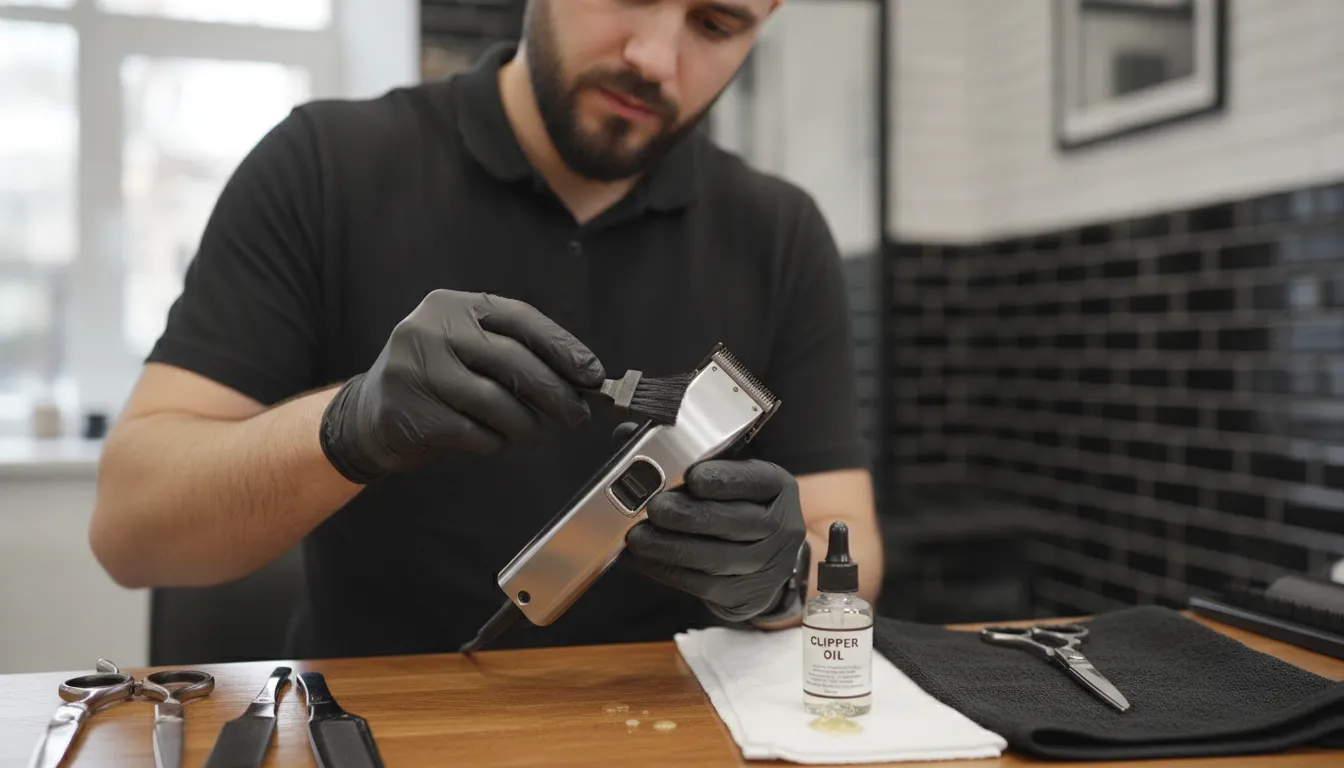
Apply only oil intended for clippers, following the tool manufacturer's instructions. A common method is to place small drops across the blade while the clipper runs briefly, keeping oil away from the housing, then switch it off and wipe away excess. Exact placement and frequency can vary by model. BuyBarber's guide to oiling barber clippers correctly explains the basic maintenance process.
Short cut hairs can pack into the blade teeth and beneath the cutter. Styling product, skin oil, and dust can make that debris cling to the assembly. The added resistance causes the moving blade to drag, creating more friction and requiring more effort from the drive system. A blade may look clean from above while still holding compacted debris below its cutting surface.
Brush loose hair away between clients according to your sanitation process. Clean and disinfect the tool using products and contact times approved for the equipment, then lubricate it as directed. Never immerse a clipper body or apply liquid where the manufacturer prohibits it. Keeping the blade path clear is safer and more effective than trying to cool a dirty blade while it remains on a client.
A dull or damaged blade does not pass through hair efficiently. It may snag, pull, or require repeated passes, all of which extend run time and place extra load on the clipper. Incorrectly installed or misaligned components can also bind. With adjustable equipment, excessive blade tension can increase friction; tension that is too loose can reduce cutting quality. Follow the exact manufacturer procedure rather than guessing at adjustments.
Heat concentrated in the housing points to a different concern. Blocked ventilation, a binding blade, heavy workload, battery trouble, or an internal electrical or mechanical fault can make the motor area unusually hot. Barbers can safely inspect accessible vents and removable blades as the manual permits. Opening a sealed housing, altering wiring, or bypassing safety components should be left to an authorized or qualified service professional.
Where the heat appears, how quickly it develops, and what other symptoms accompany it can narrow the cause. The table below is a practical first check, not a substitute for the manufacturer's manual or professional service. Always stop before touching any surface that may be hot enough to cause discomfort.
| Observation | Likely area to check | Safe first action | When to stop using it |
|---|---|---|---|
| Blade warms gradually during continuous cutting | Normal friction and run time | Pause, check temperature, brush away hair, and oil as directed | If the blade could discomfort the client or stays hot after maintenance |
| Blade heats quickly or begins pulling | Low lubrication, packed debris, dullness, alignment, or binding | Power off, cool, clean, inspect the removable blade, and lubricate | If pulling, binding, damage, or rapid heating continues |
| Housing becomes unusually hot | Vent blockage, motor load, battery, or internal fault | Power off, disconnect, cool, and check only accessible vents and parts | If heat returns quickly or the motor changes sound or speed |
| Burning odor, smoke, sparks, damaged cord, or swollen battery | Potential electrical or battery failure | Switch off and disconnect only if safe to do so | Immediately; isolate it safely and arrange qualified service |
A warm blade with a normal-sounding motor often suggests ordinary friction or a maintenance need. A hot handle, slowing motor, unusual vibration, or electrical odor deserves more caution. Do not continue a cut just because the blade itself feels acceptable. Internal heat can indicate a fault that routine oiling will not correct.
Prevention is mostly a matter of consistent, model-appropriate maintenance and disciplined station habits. The goal is not to make a running clipper remain cold. The goal is to control friction, avoid unnecessary load, spot changes early, and keep heat away from the client's skin.
Make a quick tool check part of every reset. That keeps hair from accumulating through a full shift and gives the barber a chance to notice a change before it becomes severe. A practical routine includes:
Do not assume that a spray marketed for one maintenance purpose replaces every other step. Cleaning, disinfection, lubrication, and cooling are related but distinct. Use only products compatible with the clipper and blade finish. For a broader station checklist, see BuyBarber's guide to building a clipper and trimmer maintenance kit.
Good technique can reduce both heat and wear. Start with hair that is prepared appropriately for the planned service, and avoid forcing the blade through a section it cannot cut cleanly. If the tool begins to tug or requires repeated passes, stop and identify why. Continuing under heavy resistance produces more heat and can reduce comfort and cut quality.
Stock up on professional clipper oil for dependable maintenance throughout busy shifts.
Many professional barbers rotate between clippers during back-to-back appointments. Rotation gives a warm tool time to cool naturally and helps maintain a comfortable blade temperature. It is a workload-management strategy, not a repair. If one tool heats much faster than comparable tools under similar conditions, remove it from service and investigate rather than repeatedly setting it aside and returning it to the client.
Detachable blades can also be rotated when the clipper and manufacturer permit it. Handle a warm blade carefully and use the correct removal process. Never place a hot blade directly on skin, cool it with water, or use a replacement blade that is incompatible with the model.
When a clipper becomes unusually hot, work from the simplest external causes toward the possibility of professional service. This sequence limits risk and avoids unsupported repairs. Consult the manual if any step differs for your model.
A barber can replace or clean user-serviceable components when the manual clearly supports the procedure. Internal electrical diagnosis is different. Do not open battery packs, splice cords, defeat switches, or keep running a tool with a possible internal fault. BuyBarber's overview of hair clipper troubleshooting and repair decisions can help clarify when professional service is the appropriate next step.
For a tool used heavily in a professional shop, a short maintenance log can reveal useful patterns. Note the clipper model, blade, approximate run time, service type, heat location, maintenance performed, and whether the symptom returned. This information helps a service technician evaluate an intermittent issue and makes it easier to compare performance across the station.
Also note changes in sound, speed, vibration, battery runtime, or cutting quality. Heat rarely exists in isolation when a mechanical or electrical fault is developing. Early removal from service protects clients and may prevent more extensive damage.
Stop as soon as the blade may be uncomfortable on a client's skin. There is no need to wait for smoke or failure. Skin sensitivity differs, and a blade can feel hotter to the client than it does in the barber's hand. Checking on your own wrist away from the client can help, but it does not override client feedback or professional judgment.
Keep the clipper out of service when routine cooling, cleaning, and lubrication do not correct rapid heating. The same applies when it repeatedly pulls, binds, slows, vibrates unusually, or makes a different sound. These symptoms can indicate blade damage, drive trouble, or motor load beyond what external maintenance can resolve.
Immediate stop-use signs include:
For a suspected battery or electrical problem, follow manufacturer guidance for isolation, storage, transport, and service. Do not place a damaged lithium-ion battery in general waste or attempt to open it. Qualified support is the safest route.
Yes. The motor and fast-moving blades naturally create some warmth during use. The concern is excessive or rapidly increasing heat, especially if the blade could discomfort a client, the housing becomes unusually hot, or the clipper changes sound, speed, or cutting performance.
Follow the clipper manufacturer's instructions because frequency and placement vary by model and workload. During a busy shift, inspect and lubricate often enough to keep the blade moving smoothly. Clean away loose hair first, apply only approved clipper oil, and wipe off excess before client contact.
No. Water can promote corrosion and create an electrical hazard if it enters the clipper. Stop using the tool and let it cool naturally on a stable, dry surface. Clean, disinfect, dry, and lubricate only with methods and products approved for that equipment.
Oil cannot correct every cause. Packed debris, a dull or damaged blade, incorrect installation, blocked vents, heavy motor load, battery trouble, or an internal fault may still create heat. If approved cleaning and inspection do not solve rapid heating, remove the clipper from service and seek qualified support.
Shop clipper oil at BuyBarber.com and keep proper lubrication within reach at every station.


